How to choose an AI headshot tool
Choose the tool whose customer examples look like the real people, and that states its price, wait, refund terms and deletion policy before you pay.
Start with likeness. A headshot that does not look like you is useless at any price.
Updated . Next:AI headshots or a studio photographer

Eight things to check
1Likeness to the real person
Look for customers' selfies shown beside their finished headshots. Finished headshots alone cannot show whether the tool keeps a face.
Try it on
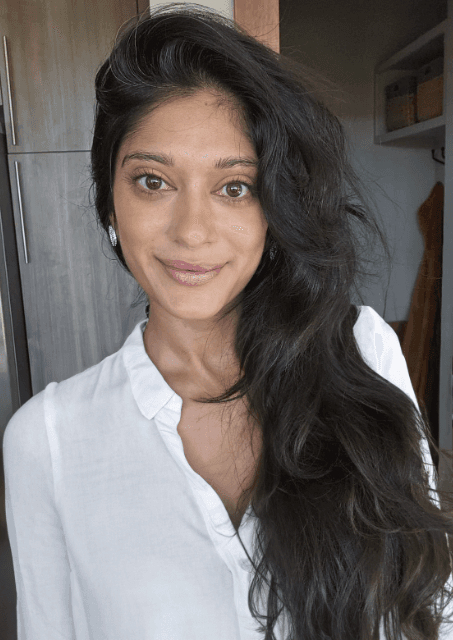
The photos at the top of this page are a customer's selfie and her headshot. The headshots page shows more customers the same way.
See customer examples2Photos you must upload
Find the minimum number of photos before you sign up. Every extra photo a tool requires is more work before you can start.
Try it on
1 to 5 selfies. One is enough and three is best.
3Turnaround time
Find the stated wait between upload and finished photos. If you need the photo for an application or a launch, the wait decides whether the tool is any use.
Try it on
About 3 minutes after you upload your selfies.
4Price per usable photo
Divide the price by the number of photos you would put on your profile, not the number the tool generates. Check whether you pay once or subscribe, and whether fixing a near miss costs extra.
Try it on
From $35, paid once, with no subscription. You get 20, 50 or 100 headshots per photoshoot, and credits for edits are included.
5Privacy and deletion
Read the privacy policy for two things: whether you can delete your photos yourself, and how long the company keeps them if you do nothing.
Try it on
You can permanently delete your headshots from our servers once they are generated. We store headshots for 90 days and then delete them, unless you have a team project or a subscription that includes storage.
Privacy policy6Refund terms
Find the refund clause in the terms of service before you pay. If a tool gives no refunds, judge it on its customer examples first.
Try it on
We do not offer refunds once you have paid. You pay after you upload your selfies, so look at the customer examples first.
Terms of service7Range of styles
Check that the tool has the look your field expects, and more than one version of it. A lawyer and a designer rarely want the same backdrop.
Try it on
200+ styles to choose from. The editor changes details afterwards, such as the jacket or the background.
8Team use
On a company page everyone needs the same style. Check for per-person pricing, one shared style, and invitations that let each person upload their own selfies.
Try it on
Team headshots cost from $26 per person. You choose one portrait style and invite people one by one or with a CSV file. Each person gets 20 portraits.
Questions about choosing a tool
What matters most when choosing an AI headshot tool?
Likeness. Compare a tool's customer selfies with the finished headshots before you pay.
How many photos should an AI headshot tool need?
It depends on the tool, so check the minimum before you sign up. Try it on needs one selfie, works best with three and accepts up to five.
How much do AI headshots cost?
Compare the price per photo you would use, and check whether you pay once or subscribe. Try it on costs from $35, paid once, for 20, 50 or 100 headshots per photoshoot.
Can I get a refund if I don't like my AI headshots?
Refund terms differ between tools, so read them before you pay. Try it on does not offer refunds once you have paid. Every photoshoot includes credits to edit a photo you almost like.
What happens to my headshots after they are made?
Check each tool's privacy policy for deletion and storage. On Try it on you can permanently delete your headshots once they are generated. Otherwise Try it on stores them for 90 days and then deletes them, unless you have a team project or a subscription that includes storage.
Can a whole team use an AI headshot tool?
Yes, if the tool applies one style to everyone and prices per person. Try it on team headshots cost from $26 per person. Each person uploads their own selfies and gets 20 portraits in the team's style.